Do I really need an iPad? Does anyone? Well with the iPad costing $499 it should help me accomplish many different things. I am going to compile 499 things that I will use my iPad for. It could be as simple as using it to make salsa.
If you have anything that you love to use your iPad for sound off in the comments to help me build my list.
Tuesday, April 26, 2011


Friday, April 8, 2011
iPad Me "Pretty Please!"
This week I was told I have a crush on an iPad 2.

At first when my wife told me this I thought "No I don't," then it hit me, I do have a crush! Ever since iPad was announced in 2010 I have probably talked about it every day. Sometimes the most exciting thing I have to talk about when I come home from school is how many people in class had an iPad.
If you have ever met someone that has one, they love it. If you have ever met someone that has played with one, they loved it. I love the idea of tablet computing so much that I even have another blog called Tablet In A Minute. With that site my goal is to teach the general population how to use tablets. The main problem I have is the lack of a tablet.
Right now the market is being flooded with tablets but I would say the winner is the iPad 2 from Apple. They have done an excellent job. If I had the funds, I would just go buy one. Being a full time student, husband, and soon to be father drains my full paycheck and leaves nothing left for gadgets.
"So, how can I help?" you ask. It is easy. Just give me one dollar. That is it. $1 is all it takes. Let's say you make six dollars an hour. You have already given me one minute, so what is another 9 minutes of work to donate $1 to me? Maybe you lost a dollar of change the last time you sat down in your car. All you need to do is find it, and send it my way. In return you shall receive happiness. You won't be able to drive home without smiling, because you, my friend, did good in the world today and helped me out. Enough talk, click below.
Thank you, from the bottom of my heart. You are awesome!
At first when my wife told me this I thought "No I don't," then it hit me, I do have a crush! Ever since iPad was announced in 2010 I have probably talked about it every day. Sometimes the most exciting thing I have to talk about when I come home from school is how many people in class had an iPad.
If you have ever met someone that has one, they love it. If you have ever met someone that has played with one, they loved it. I love the idea of tablet computing so much that I even have another blog called Tablet In A Minute. With that site my goal is to teach the general population how to use tablets. The main problem I have is the lack of a tablet.
Right now the market is being flooded with tablets but I would say the winner is the iPad 2
from Apple. They have done an excellent job. If I had the funds, I would just go buy one. Being a full time student, husband, and soon to be father drains my full paycheck and leaves nothing left for gadgets."So, how can I help?" you ask. It is easy. Just give me one dollar. That is it. $1 is all it takes. Let's say you make six dollars an hour. You have already given me one minute, so what is another 9 minutes of work to donate $1 to me? Maybe you lost a dollar of change the last time you sat down in your car. All you need to do is find it, and send it my way. In return you shall receive happiness. You won't be able to drive home without smiling, because you, my friend, did good in the world today and helped me out. Enough talk, click below.
Thank you, from the bottom of my heart. You are awesome!
Monday, April 4, 2011
U Move Fitness First Wii Nunchuck
Here is yet another one of my great ideas that just sat in my head while someone went out and made it and is going to get rich.
So did you buy a Wii so that the kids would be more active while playing video games? Have they now figured out how to use the controllers to fake the motions while sitting on the couch? Here is the ultimate solution.
This U Move Nunchuck will work like a normal controller but has a built in pedometer. It allows you to count your steps and calories burned. Take a look at the video to how it is used.
Is how it works is the game will not allow the character go move unless the nunchuck is in motion. If you stop jogging in place the character will stop jogging. I can see how this would be a very effective way of staying active while playing games. If I would have had this when I played Mario and got all 60 stars, I am sure I would have lost a few pounds with all those hours of game play.
My idea was to have some sort of attachment that would go on your foot or something. I also thought it would be great to have a pedometer that you could use outside and for every step you took outside it would allow you take that many steps with Mario .
.
I am not positive this works on US consoles. This is something my mom would have dreamed of. Maybe the kids will like it, or maybe they will realize it is just more fun to go outside and play with friends.
So did you buy a Wii
so that the kids would be more active while playing video games? Have they now figured out how to use the controllers to fake the motions while sitting on the couch? Here is the ultimate solution.This U Move Nunchuck will work like a normal controller but has a built in pedometer. It allows you to count your steps and calories burned. Take a look at the video to how it is used.
Is how it works is the game will not allow the character go move unless the nunchuck is in motion. If you stop jogging in place the character will stop jogging. I can see how this would be a very effective way of staying active while playing games. If I would have had this when I played Mario
and got all 60 stars, I am sure I would have lost a few pounds with all those hours of game play.My idea was to have some sort of attachment that would go on your foot or something. I also thought it would be great to have a pedometer that you could use outside and for every step you took outside it would allow you take that many steps with Mario
.I am not positive this works on US consoles. This is something my mom would have dreamed of. Maybe the kids will like it, or maybe they will realize it is just more fun to go outside and play with friends.
Monday, March 21, 2011
What Is A Browser?
When you buy a computer it comes with most of the software that you want to use on a day to day basis. Some of the time you may buy the Microsoft Office suite or iLife
 & iWork
 to add a bit of the most well needed applications to be fully functional.
The main program that you use daily is pre-installed on the computer. This would be your web browser. With a PC it will have Internet Explorer (IE) and with a Mac it will have Safari. Did you know that these browsers have different functions and that you can actually use these and many other browsers on your computer. You may have only used IE or Safari but other browsers are Firefox, Google Chrome, and Opera. Google has made an excellent video about what a browser is. Even though they are promoting Chrome, I think it gives a great explanation as to what a browser is.

So which one should you choose? From my experience most people are using IE on their PC. IE is only available on a Windows computer. IE just released version 9 (which is only available if you have Windows 7 ) when most of the computers if have used are still using version 7. You may even be using IE right now and be fine with it. My mother in-law had a problem using it when she tried to access a web site and it would not let her load the site because it said her browser was out of date. It was also giving her other problems as simple as not letting her print. I have also had a few colleges ask me how they can see more of actual screen space when browsing because the IE tabs are taking up all the room. With IE 9 they cleaned it up quite a bit but I have not spent to much time with it.


Safari is made by Apple. It just had an update, and it is available on Mac and PC. That is all.

Firefox is very well known. It is has been on out since 2005. In only a few years it almost reached 50% of the market. At my school Firefox is the only other software that is installed for students to use. This is because the Blackboard system does not work well in IE. Firefox offers many extensions, add-ons, and customizable themes. I used Firefox for quite sometime until it began to act very slow for me.

Opera browser has been out for awhile. I first heard of it when I was searching for a better browser on my Samsung Instinct . I was able to find a version for my phone and it worked great! From using the phone app I was curious about the desktop version. I installed it it found it to be very usable. One of the best features that it has was the ability to sync my bookmarks from the mobile app to the desktop. They are also one of the few browser that is able to work on many devices.

Google Chrome was released in September of 2008. After 2 years it has now more than 20% of the market. I have been using it since the day it came out. It has progressed over time and has been given every feature you would need in a modern browser. It has the ability to add custom themes, extension, and now even apps. In its most recent version it was able to boost its speed far above everyone else.
One of the greatest features of Chrome is the ability to sync all your bookmarks, apps, and browser info. If you are using Chrome you can set this up by going to settings and signing in with your Google account. This allows you to keep all the computers that you use in sync. So say you have Chrome on your computer at work. You create a bookmark and install a extension, then you go home and load up Chrome on your computer and the bookmark and extension you added are automatically sync to the browser where you added them at work. This feature is really great so you don't have to do double the work to keep you favorites in place.
Chrome also updates itself automatically whenever you open it. This is really convenient so you don't have to take time to download and install a new version. I find the extremely helpful to everyone so that the browser receives the greatest and up to date software. All the problems that my mother in law was having with IE was solved by me installing Chrome. In the future if the websites she uses needs a newer browser she will be fine since Chrome will always be up to date.

Chrome is also very simple compared to IE as pictured above. As you see in the picture of Chrome there is only one bar at the top. This is referred to as the Ominbar. You can type in a web address such as www.google.com or you type in whatever you would like to search for. When you first set up Chrome you can choose the search provider you would like to use.
While much work has gone into to each of these browsers to make them all user friendly, in the end it is up to the user and preference. As you can tell I am a Chrome user. Maybe you are a Firefox fan. I would encourage you to try out another browser and see if it has some useful features. Maybe you will find something you really like, or maybe you will the rest of the browser world is years behind your current set up.
For those of you that would like to see a great break down of different browsers and there market share throughout time go here.
suite or iLife & iWork to add a bit of the most well needed applications to be fully functional.The main program that you use daily is pre-installed on the computer. This would be your web browser. With a PC it will have Internet Explorer (IE) and with a Mac it will have Safari. Did you know that these browsers have different functions and that you can actually use these and many other browsers on your computer. You may have only used IE or Safari but other browsers are Firefox, Google Chrome, and Opera. Google has made an excellent video about what a browser is. Even though they are promoting Chrome, I think it gives a great explanation as to what a browser is.
So which one should you choose? From my experience most people are using IE on their PC. IE is only available on a Windows computer. IE just released version 9 (which is only available if you have Windows 7
) when most of the computers if have used are still using version 7. You may even be using IE right now and be fine with it. My mother in-law had a problem using it when she tried to access a web site and it would not let her load the site because it said her browser was out of date. It was also giving her other problems as simple as not letting her print. I have also had a few colleges ask me how they can see more of actual screen space when browsing because the IE tabs are taking up all the room. With IE 9 they cleaned it up quite a bit but I have not spent to much time with it.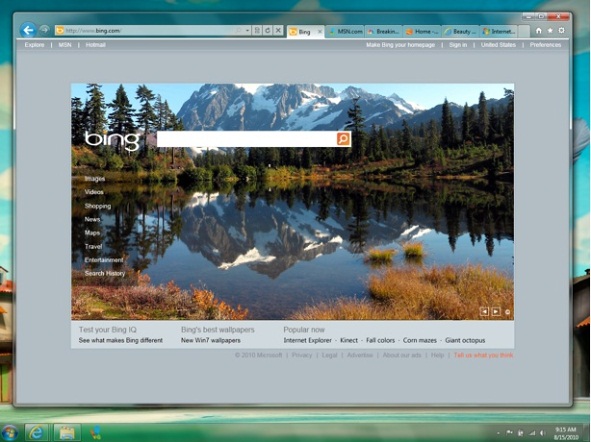

Safari is made by Apple. It just had an update, and it is available on Mac and PC. That is all.
Firefox is very well known. It is has been on out since 2005. In only a few years it almost reached 50% of the market. At my school Firefox is the only other software that is installed for students to use. This is because the Blackboard system does not work well in IE. Firefox offers many extensions, add-ons, and customizable themes. I used Firefox for quite sometime until it began to act very slow for me.
Opera browser has been out for awhile. I first heard of it when I was searching for a better browser on my Samsung Instinct
. I was able to find a version for my phone and it worked great! From using the phone app I was curious about the desktop version. I installed it it found it to be very usable. One of the best features that it has was the ability to sync my bookmarks from the mobile app to the desktop. They are also one of the few browser that is able to work on many devices.Google Chrome was released in September of 2008. After 2 years it has now more than 20% of the market. I have been using it since the day it came out. It has progressed over time and has been given every feature you would need in a modern browser. It has the ability to add custom themes, extension, and now even apps. In its most recent version it was able to boost its speed far above everyone else.
One of the greatest features of Chrome is the ability to sync all your bookmarks, apps, and browser info. If you are using Chrome you can set this up by going to settings and signing in with your Google account. This allows you to keep all the computers that you use in sync. So say you have Chrome on your computer at work. You create a bookmark and install a extension, then you go home and load up Chrome on your computer and the bookmark and extension you added are automatically sync to the browser where you added them at work. This feature is really great so you don't have to do double the work to keep you favorites in place.
Chrome also updates itself automatically whenever you open it. This is really convenient so you don't have to take time to download and install a new version. I find the extremely helpful to everyone so that the browser receives the greatest and up to date software. All the problems that my mother in law was having with IE was solved by me installing Chrome. In the future if the websites she uses needs a newer browser she will be fine since Chrome will always be up to date.
Chrome is also very simple compared to IE as pictured above. As you see in the picture of Chrome there is only one bar at the top. This is referred to as the Ominbar. You can type in a web address such as www.google.com or you type in whatever you would like to search for. When you first set up Chrome you can choose the search provider you would like to use.
While much work has gone into to each of these browsers to make them all user friendly, in the end it is up to the user and preference. As you can tell I am a Chrome user. Maybe you are a Firefox fan. I would encourage you to try out another browser and see if it has some useful features. Maybe you will find something you really like, or maybe you will the rest of the browser world is years behind your current set up.
For those of you that would like to see a great break down of different browsers and there market share throughout time go here.
Sunday, February 27, 2011
Tablet In A Minute: Otter Box iPad Case
Good review about a great case!
Tablet In A Minute: Otter Box iPad Case: "Do you have kids? Do you have a iPad? Then the Otter Box iPad case is what you need. This is a very durable case that is sure to protect you..."
Tablet In A Minute: Otter Box iPad Case: "Do you have kids? Do you have a iPad? Then the Otter Box iPad case is what you need. This is a very durable case that is sure to protect you..."
Monday, February 21, 2011
Tablet In A Minute: HP TouchPAD Introduction
Hey check out a new blog I started.
Tablet In A Minute: HP TouchPAD Introduction: "Hp had its Think Beyond event on February 9, 2011. Here they introduced three new devices. The first was a 3.1' smartphone with WebOS ..."
It is the there for all of you tablet needs.
Tablet In A Minute: HP TouchPAD Introduction: "Hp had its Think Beyond event on February 9, 2011. Here they introduced three new devices. The first was a 3.1' smartphone with WebOS ..."
It is the there for all of you tablet needs.
Thursday, February 3, 2011
Android Market Online
Yesterday Google had an event where they showed off what they have been working on. As the event was mainly to show off the Xoom Honeycomb Tablet and the new interface, they also introduced many new things to the basic Android community. The main announcement which will have the most affect is the Android Market online.
You can go to www.market.android.com and browse all the apps on the Android Market. This is truly a great advance for the market as it is building many new users will up to 300,000 Android phones activated a day. User can browse, tweet, and directly isntall apps right from with in this website. One way I have used this is as I was reading a post online about Blogger it gave a link that took me right to the Android Market to view the information about the app. Then on the web interface all I had to do was press Install and the app started downloading to my phone. It really is truly miraculous. No syncing with cables were used. I am now using the app to post this and it really was so simple. I can even see all of the apps I already have installed and those that I have purchased. If you have more than ine Dndroid device you cab choose which device you would like it to be sent to. So give it a look, and if you are not a current Android user yiu can check out all tue great apps you are missing out on.

Subscribe to:
Posts (Atom)